Wednesday, April 20, 2011

Video Resources for Teachers

I am a firm believer in using video to engage students in the classroom. Finding the right Web 2.0 tool is critical to the success of any video project. One of my favorite bloggers has a page on his website completely dedicated to video creation resources for teachers that are free and easy to use. The following stop-motion example is one of my favorite ways to use video in the classroom:

Constitution Video, Part 1 from Mr. Titzel on Vimeo.

Think about the content you are currently teaching, browse the resources on the following link for the right tool, plan a short video project, and prepare yourself to see your students come alive with excitement!
Free Technology for Teachers: Video Creation Resources 

Monday, April 4, 2011

Web Resource: aMap

This Web 2.0 resource called aMap is a very cool site that allows people to communicate various sides of an idea. The underlying structuring of aMaps is based around "informal logic" - this is the logic people use to argue in everyday life. This can be applied to the classroom by using their site to create student debates on various topics.
Interesting Web resource: aMap

Thursday, March 31, 2011

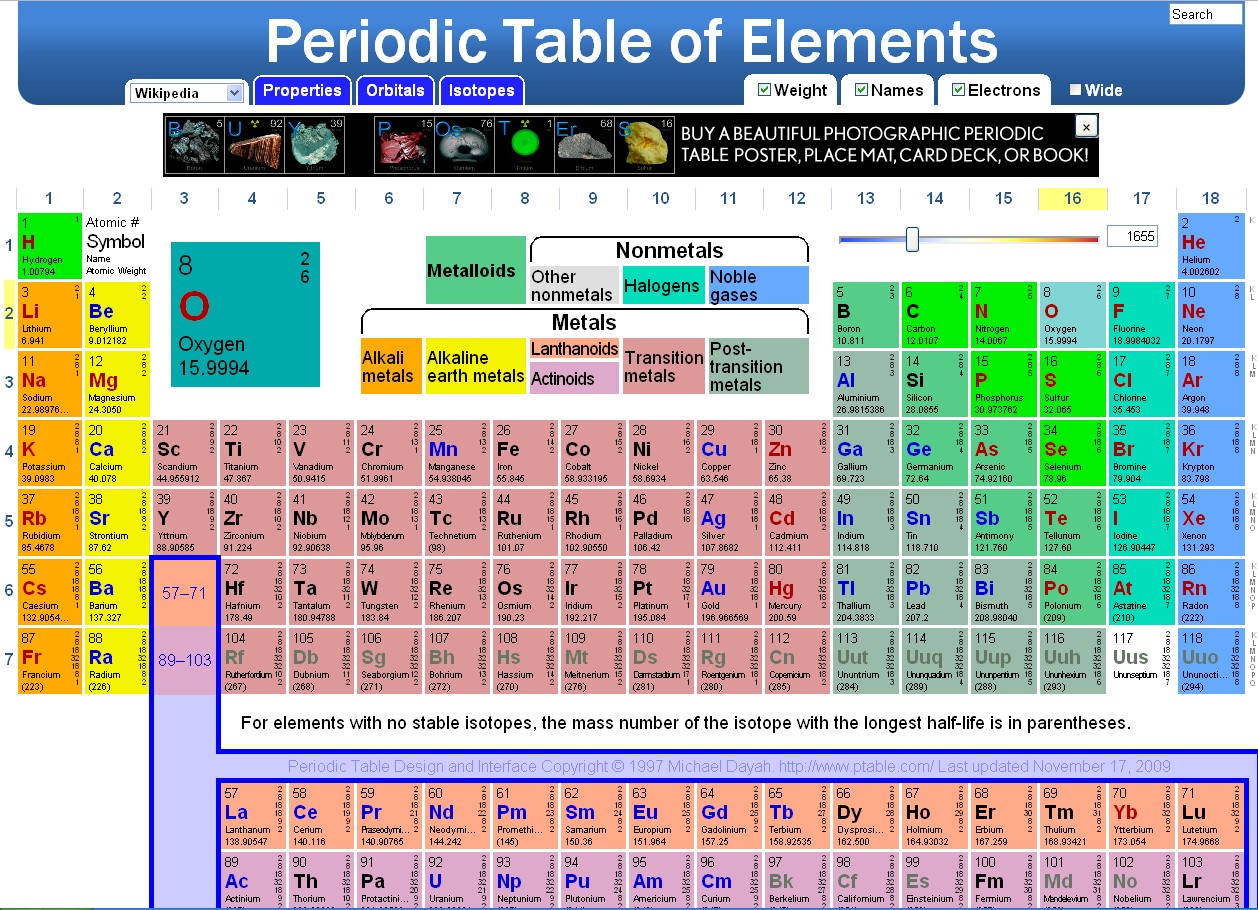
Web Resource: Interactive Periodic Table of Elements

What a great science resource! I found on a blog I follow called "Educational Technology Guy" (http://educationaltechnologyguy.blogspot.com/). This is an excerpt from his post:


 "This Interactive Periodic Table of the Elements is great and loaded with features. As you move your cursor over an element, the information for that element is shown larger above the table. If you click on an element, a pop-up window launches with more detailed information about the element (courtesy of Wikipedia). When you move your cursor over a category of elements (halogens, alkali metals, etc.), those elements highlight, and the rest fade to grey.

It will also show the properties, electron orbitals, and isotopes for each element. And, you can adjust a temperature slider and it will color code the elements based on their phase at that temperature (solid, liquid, gas, or unknown).

This is a really useful, informative, and fun periodic table to use with your classes."

Have fun playing with another fantastic resource! Follow this Link:

Tuesday, March 29, 2011

Compare and contrast: using computers to improve math education

Compare these two approaches to teaching Math:


This is a great Ed Tech blog to add to your online reader. I feel it is extremely thought provoking and current with trends in education. Read the whole article:
Compare and contrast: using computers to improve math education

Monday, March 28, 2011

Web Tools: Popplet


Written by Mark Brumley, March 1st, 2011
This month’s cool webtool is Popplet. It features a combination of mindmapping, online bulletin board and alternative presentation tool. Due to its ease of use and powerful features, Popplet has great potential for a wide range of grade levels. You can even use it as your classroom homepage! Let’s take a look at the features and some classroom strategies.
Tip: Watch this step-by-step video on using Popplet in the classroom.
As an online bulletin board, Popplet is a snap to use. The user interface may not be as elegant as other sites such as Stixy.com, but it is quite functional. Even younger students will have no problem creating content. After you have created an account and new Popplet (think of a Popplet as a bulletin board), simply double click anywhere on the screen to create a new popple. A popple can hold text, images, videos and even Google maps…perfect for a digital bulletin board project.
To create a mindmap, create a popple and type your content. While it is selected, click one of the four small circles found at each side of the popple. This will create a link to a new popple. You can also drag links to existing content and delete links as necessary. Use the mindmap functionality for any activity where students brainstorm and organize their thoughts.
Popplet is also an excellent presentation tool alternative. Once the content is placed on the board, the presentation order is determined via the presentation menu. Then, while presenting, the application will zoom in on each popple in the order you selected. This provides and excellent, non-linear approach to presenting similar to Prezi.com but with a much easier learning curve.
Popplet is one of the few webtools that is not only easy to use, but is also versatile and powerful. Give Popplet a try and post your comments on the Teacher Experience Exchange.

Monday, March 7, 2011

Generations & Their Gadgets

By: Kathryn Zickuhr (Feb 3, 2011) Pew Internet & American Life Project, http://www.pewinternet.org/Reports/2011/Generations-and-gadgets.aspx

Many devices have become popular across generations, with a majority now owning cell phones, laptops and desktop computers. Younger adults are leading the way in increased mobility, preferring laptops to desktops and using their cell phones for a variety of functions, including internet, email, music, games, and video. Read more...

Four decades of The Mini Page, now online

February 17, 2011

The Mini Page is all grown up. After delighting young readers for more than 40 years in newspapers across the country, this beloved insert has found a new home online. The University of North Carolina at Chapel Hill Library has published digital archives of The Mini Page‘s more than 2,000 issues dating from 1969 through 2007.
The collection, donated by The Mini Page founder and first editor, Betty Debnam, contains decades’ worth of lessons, activities, puzzles, pictures, and recipes based on a different topic each week. Biff Hollingsworth, a library staffer who works in the Southern Historical Collection, worked closely with Debnam to achieve her vision for how the archive should appear. “She’s considering this as a way to make sure all the issues she’s worked so hard on are given a new life,” Hollingsworth said.
Educators can put the archive to use in a variety of ways, according to Hollingsworth. If a class wanted to look at how African American history was celebrated over the last 40 years, for example, they can compare early Mini Page issues with today’s. In addition, since The Mini Page is written for early readers, the plain language might be helpful for ESL students learning to read a new language.
Visitors can currently search the collection based on date, title, people, places, and topics. Library staff are working hard to make The Mini Page archive more searchable, adding keywords and other metadata. Hollingsworth went on to say that if educators would like to be able to search via additional criteria, they can submit a request through the library contact page.
The Mini Page Archive 1969-2007